REVIEW · ICELAND
Iceland: Audioguide, Interactive map 200 spots ++
Book on GetYourGuide →Operated by My Secret Map · Bookable on GetYourGuide
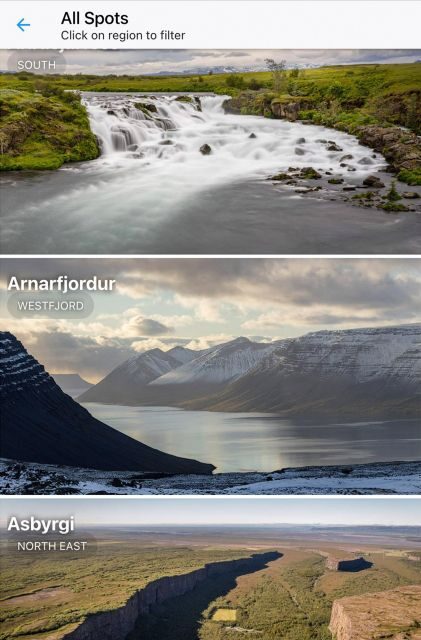
Iceland sounds different when you have a guide in your pocket. This self-guided audioguide adds 200+ spots plus a geolocation map so you can follow along without getting lost. The audio focuses on Iceland’s stories, science, and the kinds of stops most first-timers only notice by accident.
I especially like two things: the interactive map with real-time location, and the fact that you get full text transcripts alongside the audio. One drawback to plan for: you need continuous internet access to use the map and itinerary properly, so bring charging power.
200+ researched stops across famous sights and quieter places
More than 5 hours of audio in English, Français, and Deutsch
Real-time geolocation so you can orient fast and keep moving
Text transcripts for review, breaks, and quick fact checks
Photo recommendations built into the experience
365 days of access, so you can travel on your own schedule
In This Review
- Audioguide on a 365-day tap: how you actually use it
- Geolocation map and itinerary guidance: staying found in Iceland
- 5+ hours of audio: sagas, geysers, Northern Lights, and the science behind what you see
- Building your route with the 200+ spots: sagas, geysers, waterfalls, canyons, lagoons, and aurora nights
- Price and value: $17 for up to 6 is only fair if you’ll use the map
- Trust, support, and the practical limits that matter
- Should you book this Iceland audioguide?
- FAQ
- How much does the audioguide cost?
- How many spots are included?
- What languages are available?
- Do I need internet while using the map?
- How long can I use it?
- Where is the meeting point?
- Is it wheelchair accessible?
Audioguide on a 365-day tap: how you actually use it

This isn’t a bus tour. It’s a self-guided app that gives you a structured plan through Iceland’s Capital Region-style range of sights. The best part for me is the flexibility: there’s no pickup location. You can start whenever you’re ready and use it wherever you are.
You pay $17 per group up to 6, which is a big deal if you’re traveling with friends or family. If you’ve got four people in the car, you’re effectively splitting one guide cost. If you’re solo, it’s still reasonable, especially because access lasts 365 days. That means you can save it for another trip if your timing changes.
After booking, you’ll get an email with app installation instructions. The email can take up to 24 hours to arrive, so don’t wait until the last minute. You’ll need a charged smartphone and you should plan to listen with headphones or car audio for the cleanest experience.
This guide also works in three languages now: English, French, and German. Italian is marked as coming soon. So if you’re mixing languages in your group, you may be able to keep everyone on the same “route” without swapping devices.
A small practical note: the guide comes with itineraries (ways to connect spots), but you still need to check real-world conditions. Iceland weather changes fast, and roads can too. The guide helps you plan the “where and why,” but you still choose the “can we do this today.”
Geolocation map and itinerary guidance: staying found in Iceland
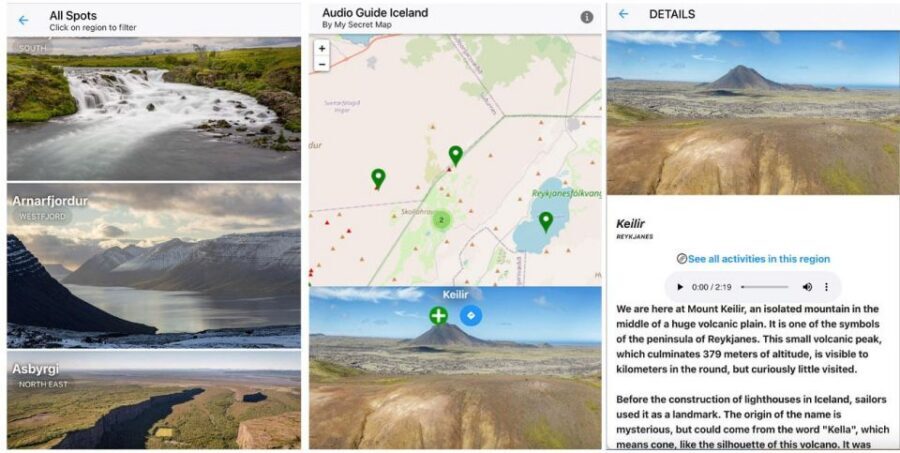
I love systems that reduce decision fatigue. This app uses an interactive map with real-time geolocation, which is exactly what you want in Iceland, where parking lots, viewpoints, and windy pull-offs can look identical from 30 meters away.
The map isn’t just a static list. It’s meant to help you confirm where you are and connect the next stop without constantly backtracking. It also offers itinerary guidance, and you get options based on how you want to travel—like the most scenic connection versus the quickest one.
Here’s the important catch: continuous internet is essential. The provider says the map, itinerary, and media downloads need it, and the app’s geolocation features also make battery drain more likely. So your success depends less on navigation skill and more on having:
- a reliable mobile data signal (or a plan that works in your area)
- a fully charged phone at the start
- and ideally a portable charger
If you’re going to rely on car audio, do it. You’ll get fewer fiddly moments with the screen. If you prefer headphones, keep volume moderate—because Iceland is still Iceland, and you want to stay aware outdoors.
Wheelchair accessibility is listed as available, which matters for how easy it is to follow the map and choose nearby options. But because specific routes aren’t provided here, you’ll want to use the map to pick stops that match your mobility needs and the day’s road conditions.
You can also read our reviews of more tours and experiences in Iceland.

5+ hours of audio: sagas, geysers, Northern Lights, and the science behind what you see
The audio is built around context. That’s not marketing talk—it shows up in the topics it covers. You’ll hear Iceland explained through sagas and legends, the science behind geysers, the Northern Lights, and geological and cultural stories that help you make sense of what you’re standing in front of.
More than once, Iceland rewards you for slowing down just enough to understand cause-and-effect: why steam behaves the way it does, why certain rock formations look the way they do, why light turns dramatic when the sky cooperates. This guide tries to give you those hooks before you lose the details in the wind and the adrenaline of photos.
The audio also comes with full textual transcripts. That’s great when:
- you’re in a noisy car and want to pause audio
- you want to skim the key points quickly
- you want to re-read a legend without replaying the whole track
You’ll also get dedicated recommendations for best photo opportunities. I like these because they nudge you toward timing and angles instead of just snapping what’s directly in front of you.
One consideration: audio tours can make time feel slippery. If you’re walking, it’s easy to speed up just to finish a track. I’d use a simple rule: start listening near a stop, then stop the audio when you want to take pictures or walk away for a minute. The guide is there to frame your experience, not rush it.
Building your route with the 200+ spots: sagas, geysers, waterfalls, canyons, lagoons, and aurora nights
You’re not given one fixed schedule that you must follow. Instead, you choose spots from the 200+ coverage and use the app’s itinerary guidance to connect them logically. Think of it as a menu with built-in explanations.
Here’s a practical way to plan your day using the themes the guide is explicitly designed around:
1) Saga and legend stops (culture first)
Start with the story-driven tracks early, when you still have patience for reading and listening. The audio includes Icelandic saga storytelling, and those myths make later geology and landmarks feel more connected.
Drawback to watch: if you’re tired or traveling with kids, long narrative sections can feel slow. Use transcripts to skim and then return to audio if you feel like it.
2) Geyser-focused science stops (understand the steam)
When you hit geysers, the guide’s science narration helps you interpret what you’re seeing instead of just thinking it’s impressive (which, yes, it is).
Drawback to watch: conditions matter. Paths can be slippery and visibility can be poor in steam. Keep your eyes on footing, not only your screen or headphones.
3) Waterfalls, canyons, and big rock scenes (where audio adds meaning)
Iceland’s water and rock scenes are built for photography, but the best effect comes when you understand why the shapes exist. The guide includes geological and cultural tales tied to places like waterfalls and canyons.
Drawback to watch: weather can limit viewpoints. If wind or rain makes safe access harder, adjust your plan using the map rather than forcing it.
4) Lagoon and water-edge spots (photo timing matters)
There’s mention of lagoons, and the guide includes photo recommendations. This is where I’d slow down for angle changes—walk a few steps, then check whether you like the view before you keep moving.
Drawback to watch: water-edge areas can feel colder and windier than you expect, even when the day looks mild from the road.
5) Northern Lights areas (listen, then watch the sky)
The guide covers the Northern Lights with audio content about their magic. On aurora nights, you’ll get more out of the experience if you understand what you’re watching while you wait.
Drawback to watch: aurora time is unpredictable, and your phone battery and internet need real attention. If you’re chasing lights, start the night with a fully charged device and expect to spend time outdoors.
How to connect spots without wasting time
The app’s itinerary guidance is there to connect attractions without turning your day into a map-hunting contest. You can pick scenic connections or quicker ones. Just remember: on Iceland roads, “quick” can still mean careful driving and short photo stops.
If you’re doing this with a group, use one phone for the primary navigation and audio, or assign one person as the “guide runner” so everyone else can stay in the moment.
Price and value: $17 for up to 6 is only fair if you’ll use the map
Let’s talk value in plain terms. The price is $17 per group up to 6, which is low compared to many guided experiences. You should feel good about it if:
- you’ll visit several of the included spots
- you’ll actually use the interactive map
- you’ll listen to audio long enough to make the stories stick
The guide includes more than 5 hours of audio, plus transcripts and photo suggestions. That’s the real value engine: you’re not paying for directions alone. You’re paying for context and practical planning, so your time outdoors feels more meaningful.
But here’s the fairness check: if you mostly plan to see just one or two famous sights, and you won’t rely on geolocation, then another simple approach might be enough. The guide really shines when you build a route and let it reduce uncertainty between stops.
Trust, support, and the practical limits that matter
The provider is My Secret Map. Their pitch is built on collaboration with local experts, historians, and geologists, and the app experience is described as crisp audio with a user-friendly interface.
One review detail I find reassuring: one buyer made a mistake and lost access, and the provider responded quickly with a new access. That’s not a small thing. When you travel, tech issues feel bigger than they are. Fast support can turn a frustrating moment into a fix.
Still, Iceland tech has rules. You must have:
- internet access (continuous for map, itinerary, and download media)
- a charged smartphone
- and headphones or car audio if you want the best sound
Also, the guide is helpful but not a weather oracle. It says you should check local conditions and advisories before heading out. I agree. Use the app to learn and navigate; use Iceland’s official info to decide what’s safe.



Should you book this Iceland audioguide?
Book it if you want self-guided freedom with real navigation support. The combination of 200+ spots, real-time geolocation, 5+ hours of audio, and transcripts makes it a smart fit for road trips and car days—especially if you hate wasted time searching for viewpoints.
Skip it if you know you won’t have consistent data access or you prefer offline guides. Since continuous internet is essential, weak signal or strict phone-savings habits can make the experience frustrating.
If you’re traveling in a group up to six, this is also one of those rare products where the price structure favors you. Add in photo recommendations and the Northern Lights audio, and it becomes a useful companion for both day scenes and late-night sky hopes.
FAQ
How much does the audioguide cost?
It costs $17 per group, with a group size of up to 6.
How many spots are included?
The audioguide covers 200++ unique Icelandic spots.
What languages are available?
The audio is available in English, French, and German. Italian is listed as coming soon.
Do I need internet while using the map?
Yes. Continuous internet access is essential to use the map, itinerary, and download media.
How long can I use it?
You get access for 365 days.
Where is the meeting point?
There is no meeting point. You can use the guide everywhere.
Is it wheelchair accessible?
Yes, it is listed as wheelchair accessible.